Starting your search with your everyday personal email is a recipe for missed opportunities. Your favorite retail coupons, streaming notifications, and family group chats will inevitably bury an urgent message from an eager recruiter. Creating a completely separate email address exclusively for your job search builds a clean slate. I recommend using a standard format like firstname.lastname.careers@gmail.com to keep things highly polished. This simple move creates a firm professional boundary between your personal life and your job hunt. It prevents you from accidentally clicking a marketing email when you should be preparing for a phone screening. Avoid using old, quirky addresses from your teenage years, as a simple, mature handle projects immediate competence. Plus, when you close that browser tab, you can actually step away from the stress of the job hunt for the evening.
Implement the Top Inbox Organization Methods for Unemployed Job Seekers
Adopting a structured framework ensures that you never lose track of a single application status. Many people swear by the Getting Things Done system because it treats every incoming message as a task to process, archive, or delegate. When you apply this methodology, your primary inbox functions purely as a temporary holding zone. Nothing sits there indefinitely, stagnating under a pile of digital dust. You either reply immediately, move the email to an active folder, or archive it if it requires no further action. Setting up this workflow gives you a clear visual map of your progress. You will instantly know which companies are waiting on your portfolio and which ones have paused their hiring process. This structured approach helps you maintain your momentum during a challenging career transition. Try to clear your main inbox by the end of every Friday so you can enjoy your weekend with a clean slate.
Build Automated Rules and Custom Filters
Setting up smart automation is the easiest way to save hours of manual sorting every week. Most major email providers allow you to create custom rules that analyze incoming text and sort messages instantly. You can set up your inbox to scan for common hiring keywords like application, interview, assessment, or scheduling. When a match occurs, the email bypasses the main view and lands in a dedicated high-priority folder. Utilizing these automated filtering rules ensures that an invitation to interview never gets lost in a sea of automated confirmation receipts. I used this trick to automatically flag emails containing the word offer in bright green, which gave me an instant dopamine hit during a long period of unemployment. It keeps you proactive rather than constantly reactive. Take twenty minutes today to configure these rules, and watch your daily stress levels drop immediately.

Create a Color-Coded Labeling System
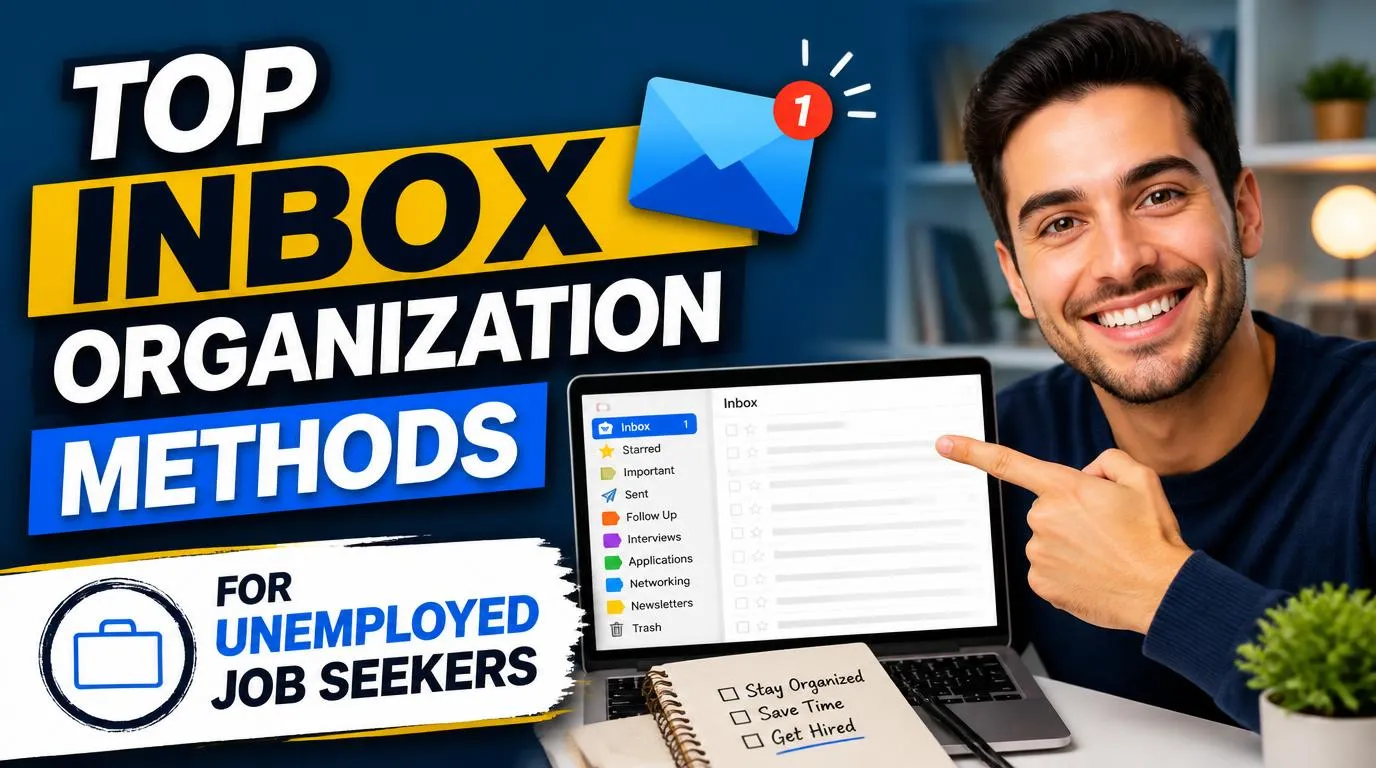
Visual cues can dramatically reduce the cognitive load of scanning a massive list of messages. By assigning specific colors to your folders or labels, you can assess your job search health in a single glance. Use bright red for immediate actions like interview invitations or follow-up tasks. Yellow can represent pending responses, while green signals active offers or advanced-stage discussions. When applying the top inbox organization methods for unemployed job seekers, color coding is your best friend. It helps your brain categorize information faster than reading text alone. If you open your application email and see a sea of yellow, you know it is time to send some polite follow-up notes. If you see too much red, you need to clear your schedule for interview preparation. This keeps your daily tasks organized without requiring you to open and read every single message repeatedly.
Connect Your Email to a Master Tracking Spreadsheet
Integrating your messages with an external tracking tool creates an unstoppable command center for your career search. Your inbox should not be the only place where your application history lives. Whenever you receive a confirmation email, log the details like the company name, job title, salary range, and date applied into a spreadsheet. Link the specific email thread to your sheet so you can pull up the conversation history with one click. Creating this master application tracker prevents you from sounding confused when a recruiter calls you out of the blue for an unscheduled phone screen. You can use free templates on Google Sheets, Trello, or Notion to build this system. This practice is incredibly helpful when managing multiple offers at once, as you can easily reference previous communications. Knowing exactly where you stand with forty different applications is incredibly empowering and keeps you looking highly professional.

Design a Daily Digital Cleanup Routine
Developing a consistent habit around managing your correspondence is just as important as setting up the folder structure itself. If you leave your email open all day, you will succumb to the temptation of constant, anxiety-inducing refreshing. Instead, restrict your checks to two or three short sessions throughout the day. Spend fifteen minutes in the morning reviewing new alerts, and another fifteen minutes in the late afternoon sending out replies. Using the top inbox organization methods for unemployed job seekers only works if you commit to daily maintenance. Adhering to these designated review windows protects your productivity and allows you to focus on actual skill-building or networking. When you treat your job search like a structured corporate role, your stress levels will decrease significantly. You will find that you get more done in less time, leaving you with room to rest and recharge without feeling guilty.
Protect Your Mental Energy by Silencing Spurious Alerts
Unsubscribing from irrelevant job boards is a critical step that many job seekers overlook during their initial setup. In the early days of unemployment, it is easy to panic and sign up for every job board on the internet. Within a week, your inbox will be flooded with dozens of daily alerts for positions that do not match your skills or location. This constant barrage of useless notifications creates a false sense of urgency and drains your mental stamina. Focus on achieving digital noise reduction by keeping only the most precise, curated alerts from platforms like LinkedIn or specialized niche boards. If an alert does not consistently deliver high-quality opportunities, delete the subscription without hesitation. Ultimately, the top inbox organization methods for unemployed job seekers are meant to serve your well-being, not just your productivity. Protecting your peace of mind is vital when you are navigating a career transition, and a clean inbox is your first line of defense.

Keep a Folder of Saved Templates for Fast Replying
Drafting responses from scratch for every single recruiter interaction is a massive waste of energy. Most of the emails you send during a job hunt fall into a few predictable categories, such as thanking an interviewer, scheduling a call, or asking for a status update. Creating a folder of saved drafts allows you to respond to opportunities in seconds rather than spending hours agonizing over word choice. Utilizing templated email replies ensures that your communication remains consistent and professional even when you are feeling exhausted. You can easily save these templates directly within Gmail or Outlook for easy, one-click access. Just make sure to double check the name fields before hitting send so you do not send a template with placeholders to a hiring manager. This simple habit keeps your response times incredibly fast, which recruiters love.
Build a Secure Digital Vault for Quick-Access Attachments
Scrambling through your computer files to find the correct version of your resume when an unexpected opportunity drops is incredibly stressful. You should keep your most up-to-date career assets directly inside your email system for instant retrieval. Create a labeled folder or keep a pinned draft containing your latest resumes, cover letter templates, and reference sheets. Having this centralized digital vault ready means you can apply to a job or send an update to a recruiter from your mobile phone while waiting in line at the grocery store. It removes the friction of applying, allowing you to act immediately when timing is everything. Make sure to label your files clearly, using clean titles like Firstname_Lastname_Resume.pdf, so they look highly polished to anyone downloading them. This level of preparation sets you apart from candidates who drag their feet.

Frequently Asked Questions
What is the best free email tool for organizing a job search?
Gmail remains the best option due to its powerful, free search capabilities and advanced filtering rules. You can easily integrate Gmail with Google Sheets to log applications automatically, keeping your entire workflow consolidated under one ecosystem without paying a single dime.
How can I use email organization methods for unemployed job seekers to handle rejection letters?
Create an automated filter that routes emails containing phrases like “not moving forward” directly into a closed folder. This prevents rejection letters from popping up as disruptive notifications, allowing you to review them on your own terms when you have the emotional capacity.
Should I use my current work email for my job search?
Never use your current employer’s email address for external job applications. Not only is it unprofessional, but your employer can monitor your messages, and you will lose access to that account immediately if you are laid off or quit.
How often should I check my job search inbox?
Limit your checks to two or three times a day, perhaps once in the morning, around noon, and late afternoon. Checking your messages constantly creates unnecessary anxiety and disrupts the deep focus you need for writing cover letters and tailoring resumes.
Conclusion
Reclaiming control of your email is a small but incredibly powerful step toward landing your next great role. By treating your inbox like an efficient workspace rather than a chaotic dumping ground, you protect both your time and your peace of mind. Which of these sorting strategies are you going to set up first?